Walk-Forward Testing and Out-of-Sample Testing Explained, With a No-Code Example for Stocks and Crypto
Quick answer: out-of-sample testing means tuning a strategy on one part of your data and testing it on a later part it has never seen. Walk-forward testing repeats that in rolling rounds: optimize on a practice window, test on the window right after it, then move both forward. Judge the strategy only by the test windows. It is the most practical defence against overfitting, for a stock strategy on Apple as much as a crypto strategy on Bitcoin.
Written by the BitLogic Team, 27 November 2026. The example is a real optimization run in BitLogic Backtester in November 2026. This article is for education only and is not financial advice. Past results do not guarantee future returns.
Key Takeaways
- In-sample data is used to build or tune a strategy; out-of-sample data is kept aside to test it honestly.
- Walk-forward testing repeats this in rolling rounds: tune on a practice period, test on the next one, move forward.
- It is the most practical defence against overfitting, the main reason backtests fail live.
- Judge only by the test periods. Expect them to be much weaker than the tuned periods; that gap is normal.
- Stocks and crypto: the method is identical, but stocks have fewer trading days and shorter intraday history, so use longer candles or more symbols.
What Are Walk-Forward and Out-of-Sample Testing?
Short answer: out-of-sample testing means tuning a strategy on one part of your data and testing it on a later part it has never seen. Walk-forward testing repeats that process in several rolling rounds: optimize on a practice window, test on the window right after it, then move both windows forward. The combined test results show how your strategy, and your way of optimizing it, would really have performed.
Why You Need Them
If you try 1,000 versions of a strategy and pick the best, that winner was chosen because it fitted the past best, partly by luck. Its backtest result is biased upward. The only fair test is data it played no part in choosing. It is like a student who memorized last year's exam answers: the real test is a new exam.
In-Sample vs Out-of-Sample
| In-sample (practice) | Out-of-sample (test) | |
|---|---|---|
| Used for | Building and optimizing rules | Judging the result |
| Results are | Optimistic, by design | An honest estimate |
| Share of data | 70 to 80% | 20 to 30% |
| Change rules after? | Yes | No: once you tune on it, it becomes in-sample |
How Walk-Forward Testing Works
Example with 7 years of daily data (November 2019 to November 2026) split into 4 back-to-back rounds, each about 15 months of practice followed by 6 months of test, roughly a 70/30 split:
| Round | Practice (optimize) | Test (unseen) |
|---|---|---|
| 1 | Nov 2019 to Feb 2021 | Feb 2021 to Aug 2021 |
| 2 | Aug 2021 to Nov 2022 | Nov 2022 to May 2023 |
| 3 | May 2023 to Aug 2024 | Aug 2024 to Feb 2025 |
| 4 | Feb 2025 to May 2026 | May 2026 to Nov 2026 |
The settings that win round 4, chosen on the most recent data, are the most relevant ones to use today.
Rolling vs Anchored Walk-Forward
- Rolling: the practice window keeps the same length and moves forward each round. It adapts faster when markets change, which suits crypto's fast-moving cycles.
- Anchored: the practice window always starts at the beginning of the data and grows each round. It uses more history, which suits slow daily stock strategies with decades of data.
Example: Walk-Forward Optimization in BitLogic Backtester
We optimized the two Donchian channel lengths of the Turtle Breakout on Bitcoin (daily, 2019 to 2026), in 4 walk-forward rounds.
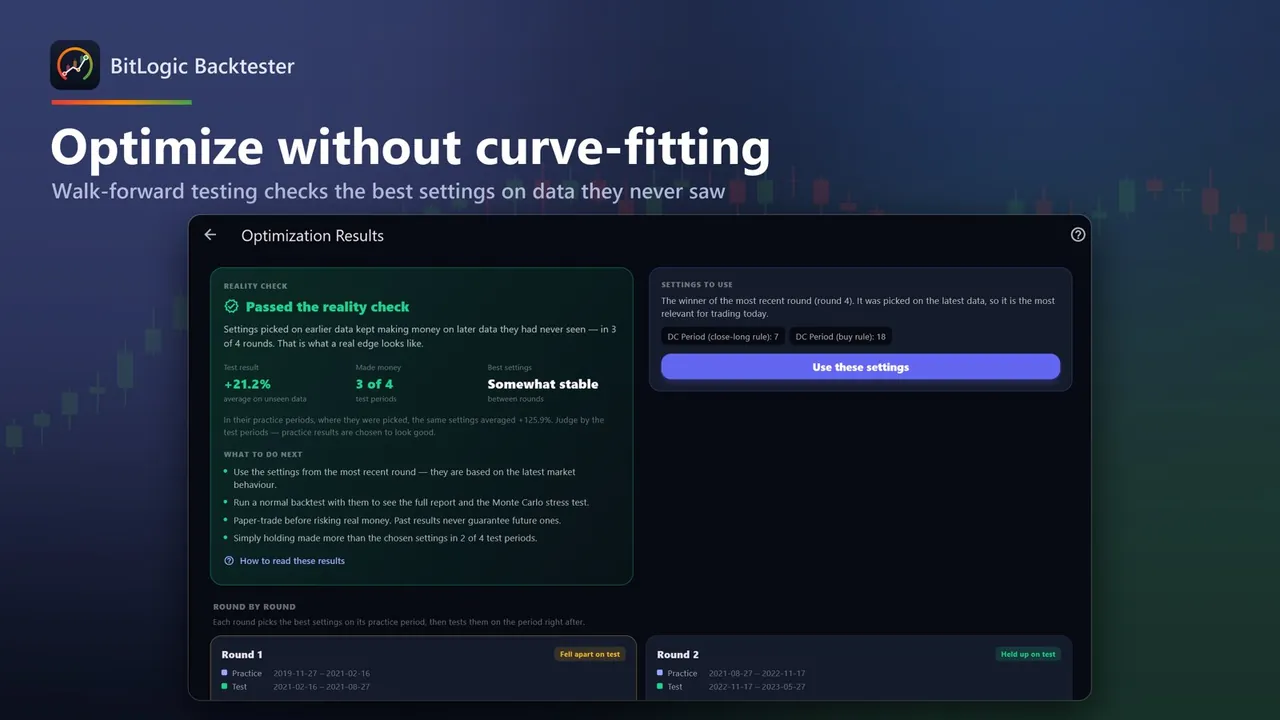
How to read it:
- Test result (+21.2%) is the honest number. The practice result (+125.9%) is inflated by selection.
- Made money in 3 of 4 test periods: consistent, not one lucky round.
- Best settings "somewhat stable" between rounds: the edge is not tied to one exact value.
- Round 1 "fell apart on test", round 2 "held up": the app shows each round, so you see where it struggled.
- Holding beat the chosen settings in 2 of 4 test periods, which the app also tells you. Beating buy and hold is a separate question from being profitable.
How to Run a Walk-Forward Optimization Without Code
- Open a strategy with adjustable numbers (an RSI length, a moving-average period, a fixed stop or target %).
- Press Optimize and tick the numbers to test, with a range for each (for example EMA length 10 to 50 in steps of 5).
- Choose the search: "Test every combination" (most thorough) or "Smart search" (samples widely, then looks closer around the best).
- Set the rounds and split: for example 4 rounds, 70% practice / 30% test. The app warns you if test periods are too short to contain enough trades.
- Optionally add more symbols so settings must work on several stocks or coins at once, and a drawdown limit so it can't just pick the riskiest settings.
- Judge by the reality check, then run a normal backtest with the chosen settings and look at the Monte Carlo tab.
Walk-Forward Testing for Stocks vs Crypto
| Topic | Stocks | Crypto |
|---|---|---|
| Trading days | About 250 a year, so fewer candles per round | 365 a year, 24/7 |
| History | Decades of daily data; intraday is short (1h about 2 years, 5m about 60 days) | Since listing, with deep intraday history |
| Best candles | Daily or 1-hour for multi-round tests | Anything from 15 minutes to daily |
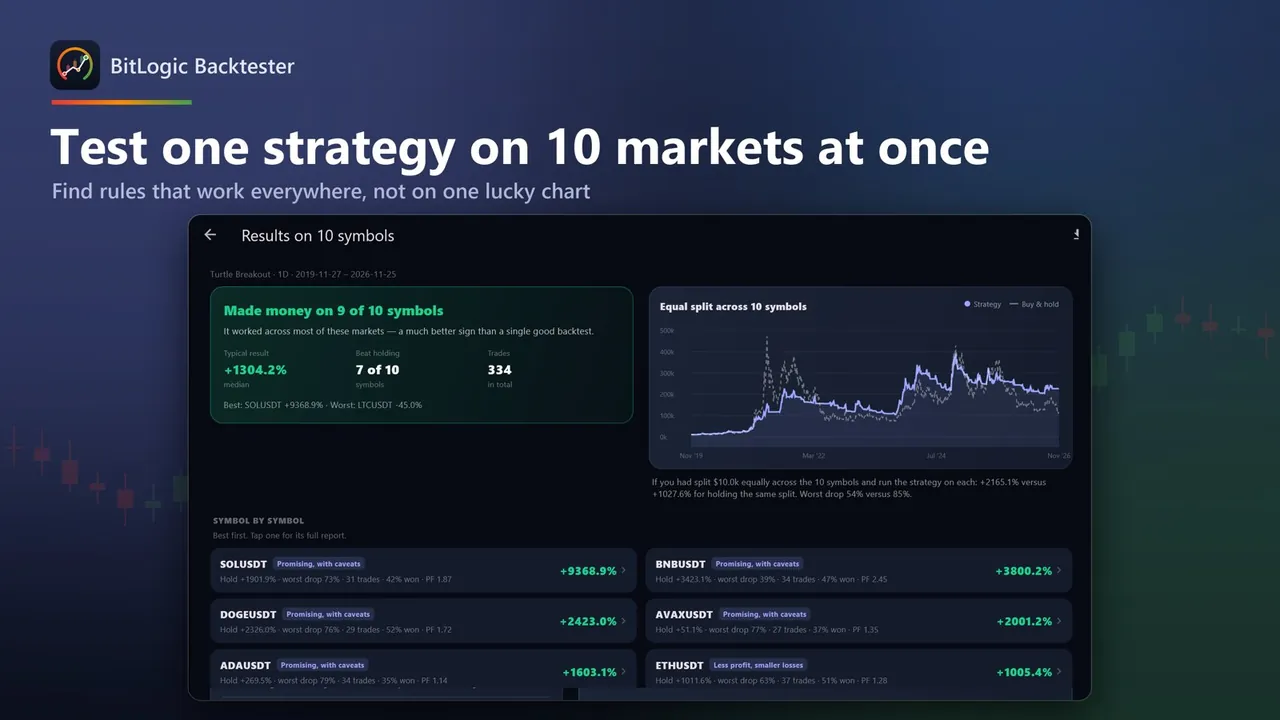
| Getting trades | Optimize across a basket of similar stocks | Optimize across several major coins |
| Regimes to include | A bear market such as 2008, 2020 or 2022 | Crashes such as 2018 or 2022 |
Because each test window must hold enough trades, rare-trading stock strategies benefit most from optimizing on several symbols at once. See how much data and how many trades you need.
What a Good Walk-Forward Result Looks Like
- Most test periods profitable after fees and slippage.
- Out-of-sample return a reasonable fraction of in-sample, not near zero or negative.
- Stable settings: similar winners from round to round.
- Enough trades in each test period to mean something.
- Works on several symbols, not one.
Red Flags
- Great practice results, losing test results: classic overfitting.
- The best settings jump wildly each round (for example EMA 12, then 47, then 18).
- Only one test period made money.
Common Mistakes
- Peeking: changing rules after seeing the out-of-sample result, then testing again on the same data. Each peek turns test data into practice data.
- Too many rounds on too little data: test periods with 3 trades prove nothing.
- Optimizing everything: sweep two or three parameters, not ten.
- Skipping costs in the optimizer, which favours high-frequency settings that fees later destroy.
After Walk-Forward: Paper Trading
Walk-forward testing uses history. The final out-of-sample test is the future: run the strategy on live prices with virtual money. BitLogic Backtester includes paper trading for stocks and crypto; read our guide to paper trading vs backtesting.
BitLogic: Alerts for the Settings That Survive
BitLogic, our crypto screener for Windows, iPhone/iPad and Android, alerts you when indicator setups appear across the market. Use BitLogic Backtester to find settings that hold up out of sample, and BitLogic to watch for them. One account works in both, and paying BitLogic Pro members get the full BitLogic Backtester included.
FAQ
What is walk-forward testing?
Walk-forward testing optimizes a strategy on a practice window of data, tests the chosen settings on the window right after it, then moves both windows forward and repeats. The combined results of the test windows show how the strategy, and the way you optimize it, would really have performed.
What is out-of-sample testing?
Out-of-sample testing means building or tuning a strategy on one part of the data (in-sample) and judging it on a later part it has never seen (out-of-sample). Only the out-of-sample result is an honest estimate.
Is walk-forward testing the same as out-of-sample testing?
Walk-forward testing is out-of-sample testing repeated over several rolling windows, which gives more independent checks than one split.
What in-sample and out-of-sample split should I use?
A common choice is 70 to 80% in-sample and 20 to 30% out-of-sample in each round. Make sure every test period still contains enough trades to judge.
How many walk-forward rounds should I use?
Often 3 to 6. More rounds give more checks but shorter periods; make sure each test period still contains enough trades.
What is the difference between anchored and rolling walk-forward?
In rolling walk-forward the practice window keeps the same length and moves forward each round. In anchored walk-forward the practice window always starts at the beginning of the data and grows each round. Rolling adapts faster to changing markets; anchored uses more data.
Which settings should I use after a walk-forward test?
Usually those chosen in the most recent round, since they are based on the latest market behaviour. BitLogic Backtester suggests these with one click.
Does walk-forward testing guarantee the strategy will work?
No, but it is far more honest than a single optimized backtest. Follow it with paper trading on live prices.
Can I walk-forward test stock strategies?
Yes. In BitLogic Backtester it works the same for stocks and crypto. Intraday stock history is shorter, so use 1-hour or daily candles for long walk-forward tests on stocks.
The Bottom Line
An optimized backtest tells you how well settings fitted the past. A walk-forward test tells you how well your method of choosing settings works on the future. Keep the search small, make sure every test window holds enough trades, judge only the unseen periods, and paper trade what survives, whether it trades stocks or crypto.
Get the apps: BitLogic Backtester on the Microsoft Store (Windows; Mac, iPhone, iPad and Android coming soon) | BitLogic screener on the App Store, Google Play and the Microsoft Store
Related guides: Why a backtest wins but loses live | How much data and trades for backtesting | Paper trading vs backtesting | Stop-loss, take-profit and indicators | BitLogic Backtester
Nothing here is financial advice. BitLogic Backtester is an analysis tool: it does not place real trades. Past results do not guarantee future returns. Questions: backtester_support@bitlogic.info.