What Is Backtesting? How to Backtest Stock and Crypto Trading Strategies Without Coding
Quick answer: Backtesting is testing a trading strategy on past market data. You write exact rules for when to buy and sell, replay them over historical candles, and measure what would have happened: profit, losses, drawdown and number of trades. It works the same way for a stock like Apple or NVIDIA as for Bitcoin, and you do not need to code. A no-code backtester such as BitLogic Backtester lets you build rules from indicator menus and test them on years of stock and crypto data in seconds.
Written by the BitLogic Team, 27 November 2026. Screenshots show real backtests run in BitLogic Backtester in November 2026. This article is for education only and is not financial advice. Past results do not guarantee future returns.
Key Takeaways
- Backtesting runs a strategy's exact rules on historical prices to see how it would have performed, before you risk real money.
- You do not need to code. A no-code backtester lets you build rules such as "buy when RSI(14) crosses above 30" from menus.
- The same process works for stocks and crypto. What changes is trading hours, costs and how much history you have.
- A trustworthy backtest includes fees and slippage, compares against buy and hold, and has enough trades to rule out luck.
- Free backtesting tools exist: Backtrader, vectorbt, MetaTrader 5, TradingView (with limits), QuantConnect (free tier) and BitLogic Backtester (3 free backtests and 1 free optimization).
- For no-code backtesting of both stocks (8 countries) and crypto on Windows, BitLogic Backtester is built for exactly this job.
What Is Backtesting?
Backtesting is testing a trading strategy on past market data, whether you trade stocks, crypto or both. Think of it as a flight simulator for a trading idea. Instead of discovering in the live market that "buy when the price breaks the 20-day high" loses money in sideways markets, you find out in a few seconds, on several years of data, without risking anything.
Every backtest has the same four parts:
- Market and data: the symbol (for example AAPL, NVDA or BTCUSDT), the candle size (1 minute to 1 week) and the test period.
- Entry rules: the exact conditions to open a trade, for example "close is above the 200-day EMA and RSI(14) is below 30".
- Exit rules: when to close the trade: an opposite signal, a stop loss, a take profit or a trailing stop.
- Costs and sizing: broker commissions or exchange fees, slippage, position size and, for crypto futures, funding payments.
Why Backtest a Trading Strategy?
- Kill bad ideas cheaply. Most trading ideas do not beat simply holding the asset. A backtest tells you in seconds, not after months of losses.
- Know the pain in advance. A strategy that made 300% may have dropped 55% along the way. Knowing the worst drawdown tells you whether you could actually stick with it.
- Make rules objective. Writing exact rules removes "I'll know it when I see it" trading.
- Compare and improve. Test two versions of an idea side by side, or tune a setting such as a moving-average length.
Backtesting vs Paper Trading vs Live Trading
| Method | What it uses | Speed | Best for |
|---|---|---|---|
| Backtesting | Historical data | Seconds for years of data | Filtering ideas and measuring risk |
| Paper trading (forward testing) | Live prices, virtual money | Real time | Confirming a strategy works on new data |
| Live trading | Live prices, real money | Real time | Only after both steps above |
Backtesting Stocks vs Crypto: What's Different?
The method is identical: rules, data, costs, report. The markets are not, and a good backtest accounts for the differences.
| Stocks | Crypto | |
|---|---|---|
| Trading hours | Exchange hours only; prices can gap between sessions | 24 hours a day, 7 days a week |
| Candles per year | About 250 daily candles | 365 daily candles |
| Costs to include | Broker commission, spread and slippage | Maker/taker fees and slippage, plus funding on futures |
| Price history | Often decades for large companies | Only since the coin was listed |
| Typical volatility | Lower; trends can run for years | Higher; 50%+ drawdowns are common |
| Buy-and-hold benchmark | Holding the stock (strong for winners like NVIDIA) | Holding the coin (strong in bull markets) |
| Survivorship bias | Delisted and bankrupt companies are easy to forget | Dead coins are easy to forget |
In practice: stock traders should use enough years of data to collect trades, since a daily stock strategy trades less often, and should compare honestly against holding the stock. Crypto traders should expect deep drawdowns and model fees carefully, because crypto strategies often trade more. Testing one set of rules on both, as below, quickly shows which market an idea actually suits.
How Do I Backtest a Stock or Crypto Strategy Without Coding?
Short answer: use a no-code backtester. Pick a market, build entry and exit rules from indicator menus (RSI, MACD, EMA, Bollinger Bands, Supertrend and more), press Run and read the report. In BitLogic Backtester this takes about two minutes and needs no Python, Pine Script or MQL.
Here is the full process, step by step, using a classic trend-following strategy, the Turtle Breakout, first on Bitcoin and then on NVIDIA stock. The steps are the same for any stock or coin.
Step 1: Choose the Market, Timeframe and Test Period
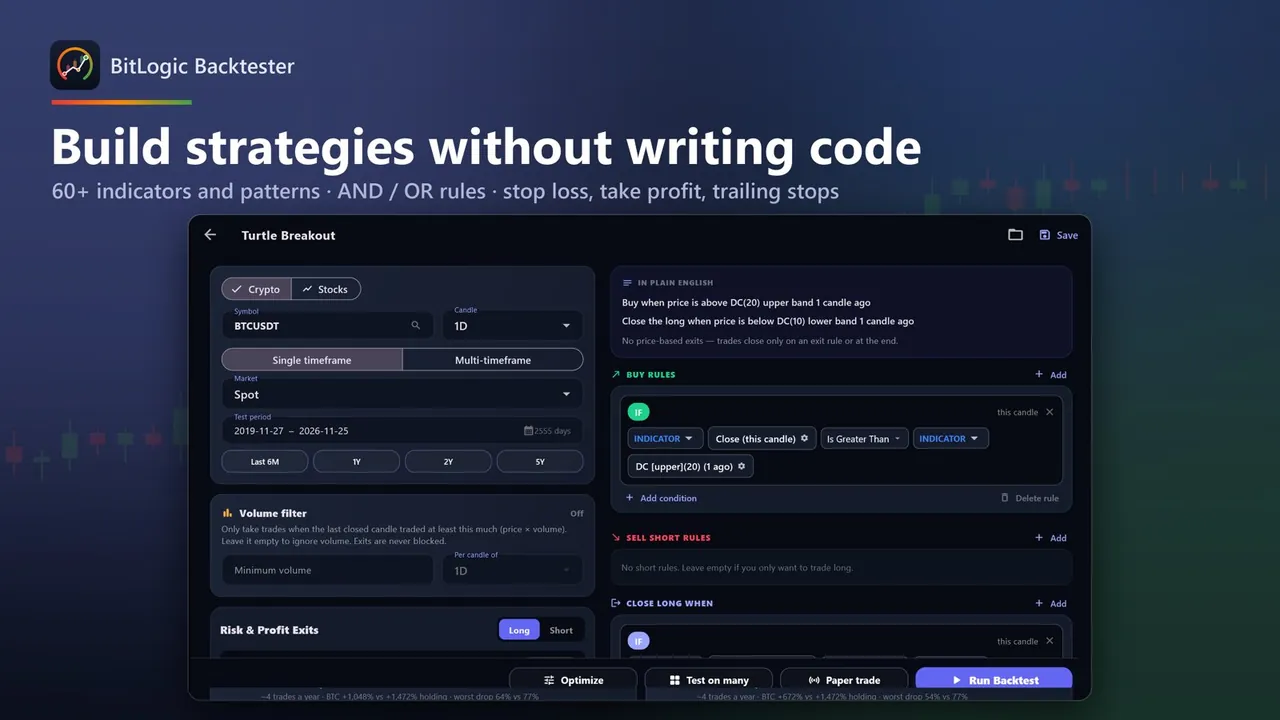
Open BitLogic Backtester and start a new strategy, or pick one of the 16 ready-made templates (Turtle Breakout, Golden Cross, Supertrend Follower and more). Choose Stocks or Crypto, type the company name, ticker or coin, and pick a candle size. For a first test, use daily candles (1D) and a long period such as 5 years, so the test covers bull, bear and sideways markets.
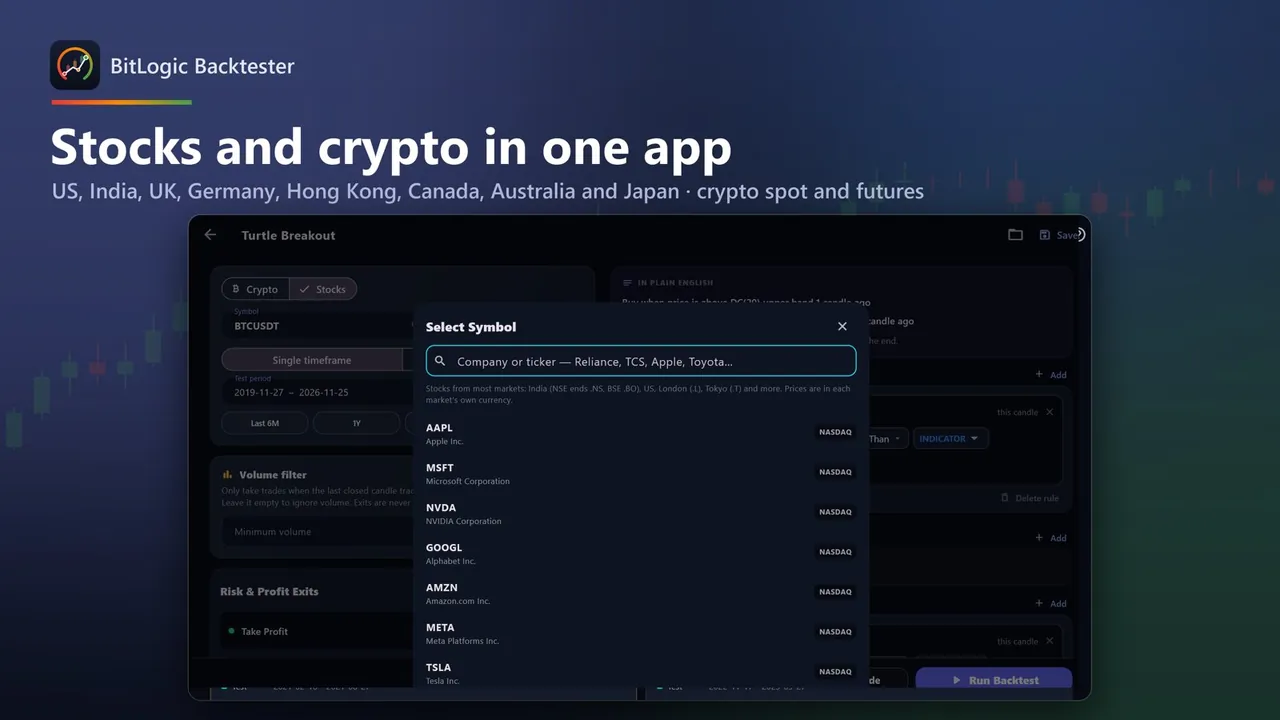
For stocks, search by company name or ticker across the US (NASDAQ and NYSE), India (NSE and BSE), the UK, Germany, Hong Kong, Canada, Australia and Japan. Prices stay in each market's own currency. For crypto, pick spot or futures pairs such as BTCUSDT or ETHUSDT.
Step 2: Write the Entry Rule
Under Buy rules, press Add and build the condition from menus. For the Turtle Breakout the rule is:
BUY WHEN Close [this candle] Is Greater Than Donchian Upper (20) [1 candle ago]In plain words: buy when the price breaks above its highest high of the last 20 days. You can combine as many conditions as you like with AND and OR, choose from 60+ indicators and candlestick patterns, and even mix timeframes, for example a 4-hour entry only when the daily trend is up.
Step 3: Write the Exit Rule and Risk Management
Under Close long when, add the exit:
CLOSE WHEN Close [this candle] Is Less Than Donchian Lower (10) [1 candle ago]Optionally add a stop loss, take profit or trailing stop in the Risk & Profit Exits panel, by percent, price or ATR (see how to set stop-loss and take-profit). The app repeats your strategy "in plain English" at the top so you can check it says what you mean.
Step 4: Include Realistic Costs
Set the fee and slippage for your broker or exchange: a stock broker's commission and spread, or a crypto exchange's maker/taker fee. This is the step most beginners skip, and it is a big reason "amazing" strategies fail live: a strategy that trades often can turn from profitable to losing once fees are counted. For crypto futures, BitLogic Backtester also includes funding payments.
Step 5: Run the Backtest and Read the Report
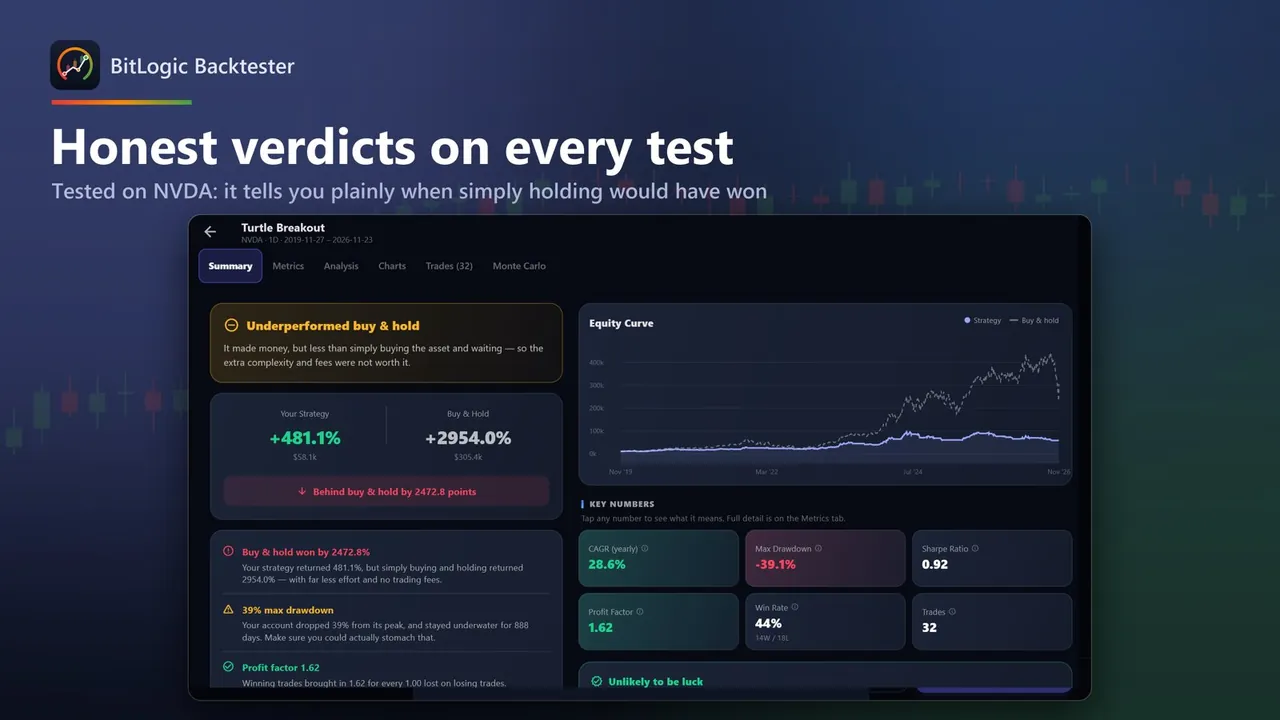
Press Run Backtest. The report opens with a verdict in plain English, then your strategy against buy and hold, the equity curve and the key numbers.
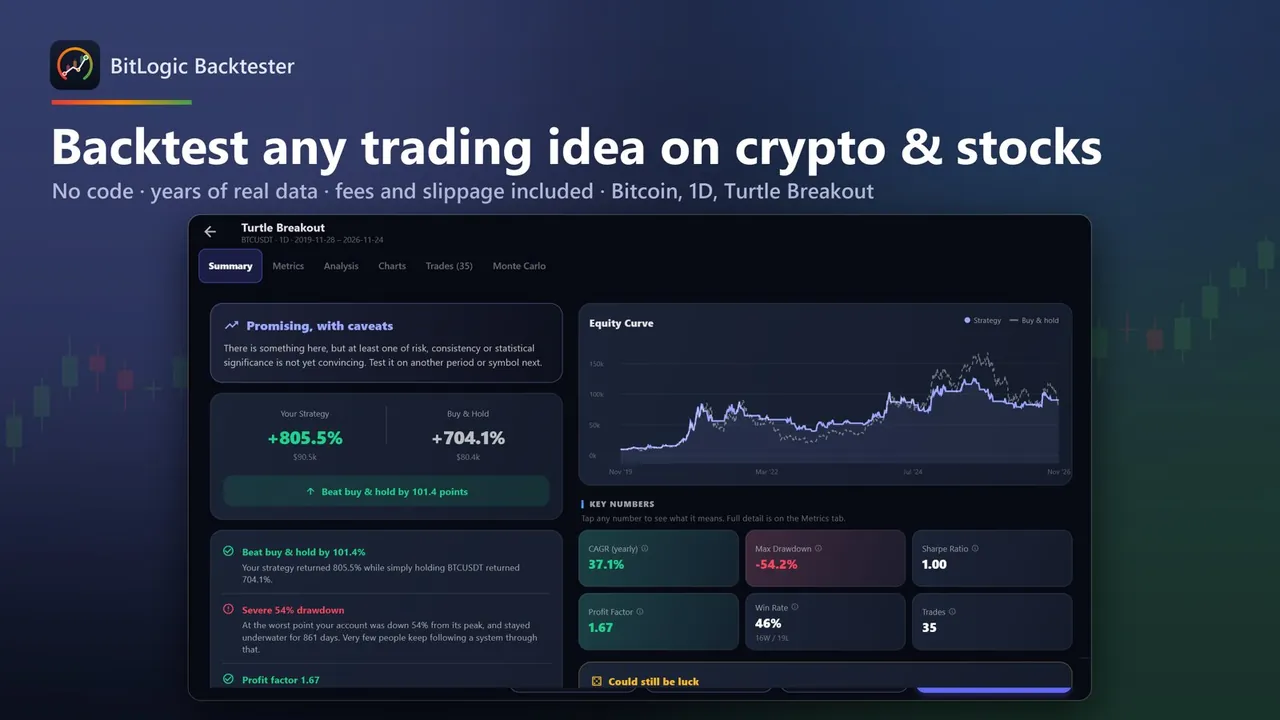
The numbers that matter most (for benchmarks, see what is a good win rate, profit factor, Sharpe ratio and drawdown):
| Metric | What it tells you | Rough guide |
|---|---|---|
| Return vs buy & hold | Whether trading beat simply holding | If it doesn't beat holding, it isn't worth the effort |
| Max drawdown | The worst fall from a peak | Could you live through it with real money? |
| Profit factor | Gross profit ÷ gross loss | Above 1.3 is decent, above 1.75 is strong |
| Win rate | Share of winning trades | Trend strategies often win under 50% and still profit |
| Sharpe ratio | Return per unit of volatility | Above 1 is good |
| Number of trades | Whether the result could be luck | Under 20 is too few; 100+ is much better (see how many trades you need) |
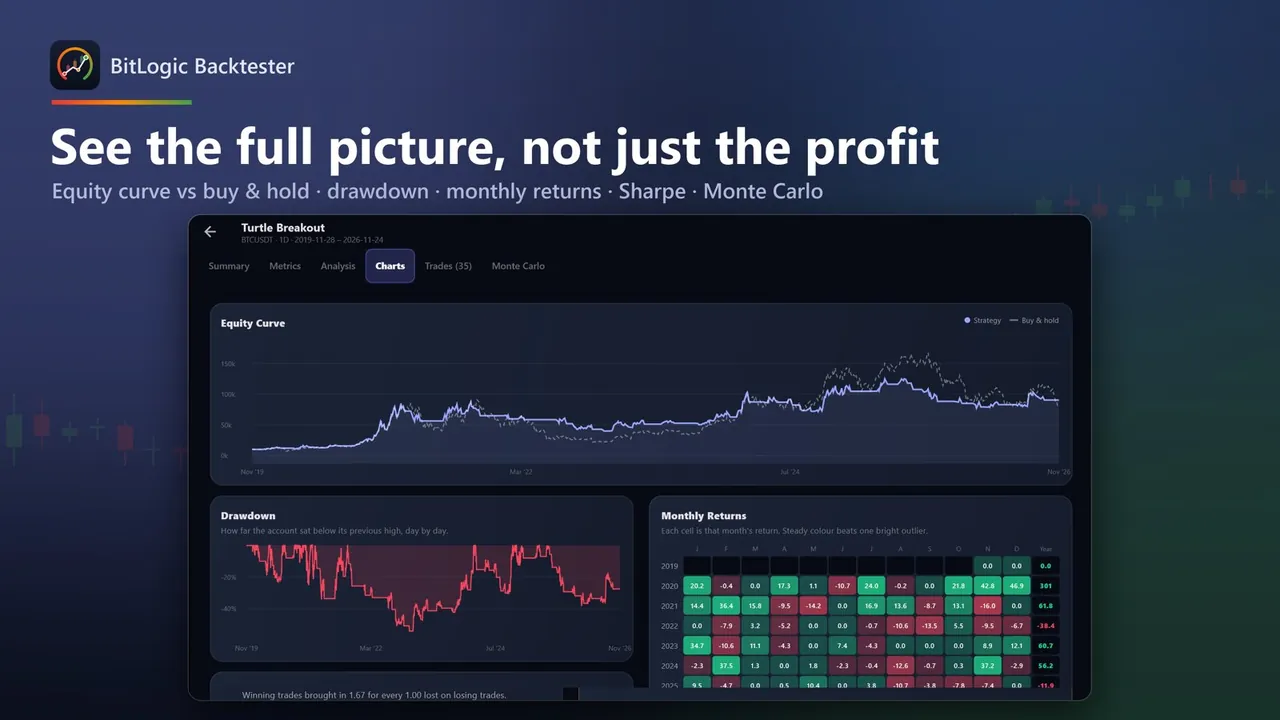
The Charts tab adds the equity curve against buy and hold, the drawdown chart and a month-by-month returns table, and the Monte Carlo tab shuffles the trades to show how bad a run of luck could get.
Step 6: Check It Isn't Luck, Then Validate
One good backtest on one symbol proves little. Before trusting a strategy:
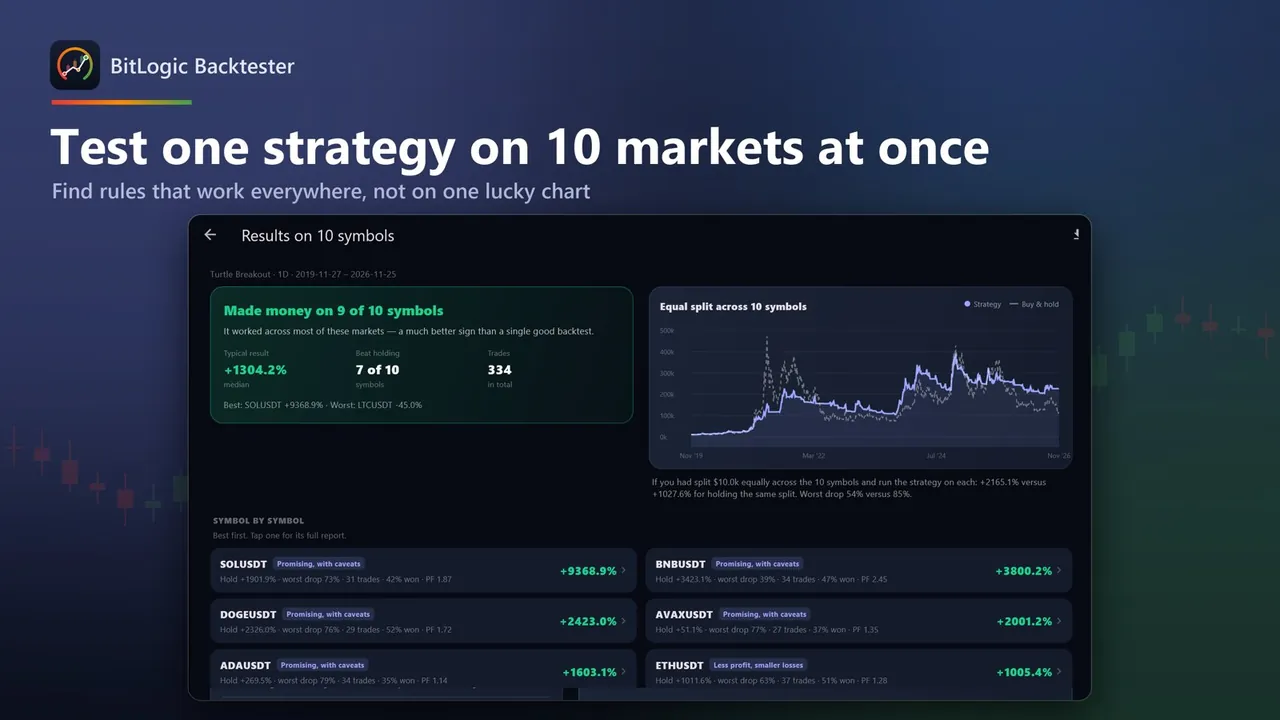
- Test on many markets. "Test on many" runs the same rules on up to 10 stocks or coins side by side. A real edge usually works on several of them.
- Compare with buy and hold honestly. The same Turtle rules that beat holding Bitcoin made +481% on NVIDIA stock, but lost badly to simply holding NVIDIA (+2,954%). BitLogic Backtester says so plainly. A strategy that suits crypto may not suit stocks, and the reverse.
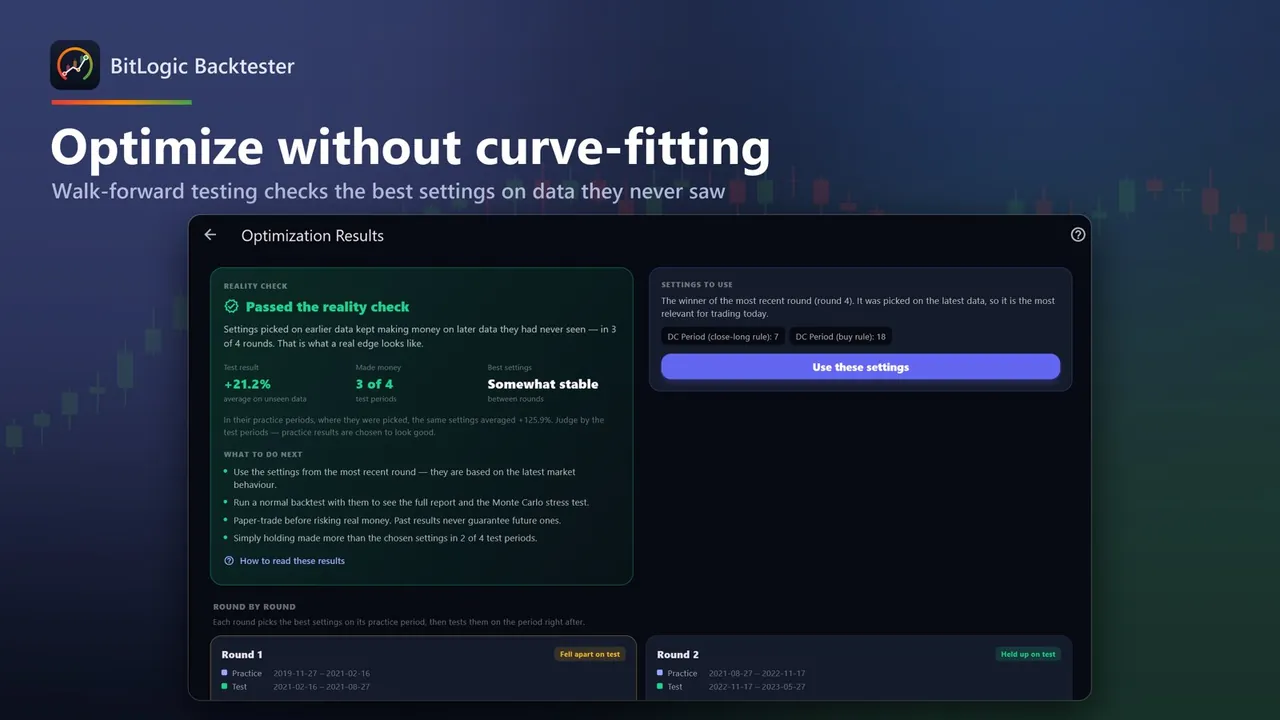
- Optimize with walk-forward testing. The optimizer searches thousands of settings, then checks the best ones on data they never saw, so you don't just curve-fit the past. See walk-forward testing explained.
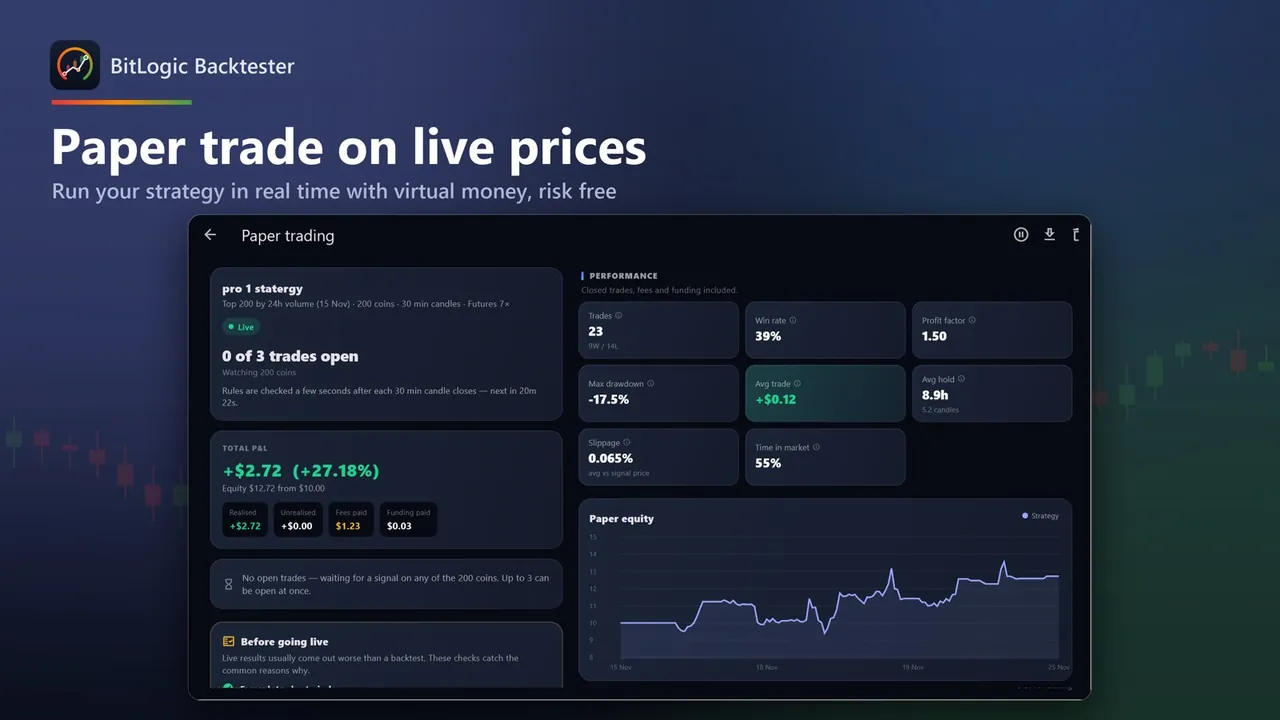
- Paper trade on live prices. Run the strategy in real time with virtual money before using real money. See paper trading vs backtesting.
Which Backtesting Tool Is Best, and Are There Free Ones?
Short answer: it depends on whether you code. Programmers do well with free Python libraries (Backtrader, vectorbt) or QuantConnect. MetaTrader 5 suits forex. TradingView suits chart-based traders who can write Pine Script. If you want to backtest stocks and crypto without coding, with costs, luck checks and walk-forward testing built in, BitLogic Backtester is designed for that, and you can start free.
Backtesting Tools Compared
| Tool | Coding needed? | Markets | Free option | Best for |
|---|---|---|---|---|
| BitLogic Backtester | No | Stocks in 8 countries, crypto spot and futures | 3 backtests + 1 optimization free | No-code traders who want realistic results and plain-English verdicts |
| TradingView Strategy Tester | Pine Script for custom strategies | Most markets | Free plan, with limits | Chart-first traders comfortable with Pine Script |
| MetaTrader 5 Strategy Tester | MQL5 for custom strategies | Mainly forex and CFDs, via a broker | Free with the platform | Forex traders using Expert Advisors |
| QuantConnect | Yes (Python or C#) | Stocks, futures, forex, crypto | Free tier | Programmers building systematic strategies |
| Backtrader / vectorbt | Yes (Python) | Any data you supply | Free, open source | Developers who want full control |
| AmiBroker | AFL scripting | Any data you supply | Trial | Experienced system traders |
Features and plans of other tools change. Check each provider's website for current details. BitLogic is not affiliated with any of them.
What to Look For in a Backtesting Tool
- Realistic costs: fees, slippage and, for crypto futures, funding. Without them, results are inflated.
- No look-ahead bias: signals must use only candles that had closed at the time.
- A buy-and-hold benchmark: beating zero is easy in a bull market; beating holding is the real test.
- Sample-size and luck checks: a warning when there are too few trades, plus Monte Carlo analysis.
- Out-of-sample validation: walk-forward optimization to avoid curve-fitting.
- Multi-market testing: the same rules on many symbols at once.
- Stocks and crypto in one place: years of built-in history for both, so you don't have to find and clean data yourself.
BitLogic Backtester covers every item on this list, without code.
Are Free Backtesting Tools Good Enough?
For learning, yes. Free Python libraries are powerful, but you must write code, find clean data and model costs yourself. Free plans of charting platforms usually limit history or features. BitLogic Backtester's free start (3 backtests and 1 optimization with a free BitLogic account) lets you test real ideas with the full engine. After that, a Week pass (US$3.50, one-time) unlocks everything for 7 days, and the Monthly (US$4.99) or Annual (US$49.99) plans also include BitLogic Pro for the crypto screener app. See plans and pricing.
Find Ideas With BitLogic, Test Them With BitLogic Backtester
BitLogic is our no-code crypto screener and alert app for iPhone and iPad, Android and Windows, plus a free web screener. It scans the market for setups such as RSI extremes, breakouts and trend changes, and alerts you when they happen. The two apps fit together:
- Spot a pattern you keep seeing in BitLogic's screener and alerts, or start from one of our prebuilt strategy setups.
- Test it in BitLogic Backtester on years of data, across many coins.
- Paper trade the version that survives, then use BitLogic alerts to catch the setup live.
One BitLogic account works in both apps, and a paid BitLogic Pro membership includes the full Backtester at no extra cost.
Common Backtesting Mistakes to Avoid
- Overfitting: tuning settings until the past looks perfect. Use walk-forward testing. See why a backtest wins but loses live.
- Ignoring costs: strategies that trade often are hit hardest by fees and slippage.
- Too few trades: 10 trades say almost nothing. Aim for 100 or more, or test on several markets. See how much data and how many trades you need.
- Testing one bull market only: include a bear market and a sideways period.
- Survivorship bias: testing only stocks and coins that still exist and did well, and forgetting delisted companies and dead coins.
- Ignoring market hours: intraday stock strategies only trade during the session, and overnight gaps can jump past a stop loss.
- Not comparing with buy and hold: a strategy can make money and still be worse than holding.
FAQ
What is backtesting in simple words?
Backtesting is checking how a set of trading rules would have performed on past prices, before you use them with real money. You apply exact entry and exit rules to historical candles and measure the return, drawdown, win rate, profit factor and number of trades, after fees.
Can I backtest a trading strategy without coding?
Yes. A no-code backtester such as BitLogic Backtester lets you build rules from indicator menus with AND and OR logic and run them on years of stock and crypto data. No Python, Pine Script or MQL is needed.
How do I backtest a stock trading strategy?
Pick the stock (for example AAPL, NVDA, Reliance or Toyota), choose daily candles and a test period of 5 years or more, build the entry and exit rules from indicators, set your broker's commission and slippage, run the test and compare the result with simply buying and holding the stock. Then test the same rules on several other stocks.
Is backtesting stocks different from backtesting crypto?
The method is the same, but the markets differ. Stocks trade only during exchange hours, so there are fewer candles per year and prices can gap overnight; crypto trades 24/7. Costs differ too: brokers charge commissions and spreads, crypto exchanges charge maker and taker fees, and crypto futures add funding payments. Stocks also often have much longer price histories than coins.
Is there a free backtesting tool?
Yes. Free options include Python libraries such as Backtrader and vectorbt (coding needed), the MetaTrader 5 Strategy Tester, TradingView's Strategy Tester on its free plan with limits, QuantConnect's free tier (coding needed), and BitLogic Backtester, which gives every free account 3 no-code backtests and 1 optimization on Windows.
Which backtesting software is best?
It depends on your skills. Programmers often choose Python libraries or QuantConnect, forex traders often use MetaTrader, and chart-first traders who write Pine Script use TradingView. Traders who want to test crypto and stock ideas without code, with fees, slippage, walk-forward testing and a luck check built in, can use BitLogic Backtester.
Can I backtest crypto and stocks in the same app?
Yes. BitLogic Backtester supports stocks from the US, India, the UK, Germany, Hong Kong, Canada, Australia and Japan, and crypto spot and futures, on timeframes from 1 minute to 1 week.
How many trades does a backtest need?
Fewer than 20 trades is too few to tell skill from luck. Aim for 100 or more, or test the same rules on several markets to collect more trades.
Does a profitable backtest guarantee future profit?
No. A backtest only shows how rules behaved in the past. Overfitting, too few trades, ignored costs and changing markets can all make a good backtest fail live. Validate with out-of-sample tests and paper trading first.
How long does a backtest take?
Seconds. Years of daily data run almost instantly. Downloading minute-level data for long periods takes longer the first time.
The Bottom Line
Backtesting is the cheapest way to find out whether a trading idea is worth your money, whether you trade stocks, crypto or both. Write exact rules, include costs, compare with buy and hold, demand enough trades, and validate on unseen data and live paper trading before going live. With a no-code tool, none of that needs programming.
Get the apps: BitLogic Backtester on the Microsoft Store (Windows; Mac, iPhone, iPad and Android coming soon) | BitLogic screener on the App Store, Google Play and the Microsoft Store
Related guides: BitLogic Backtester | Paper trading vs backtesting | Walk-forward testing | Stop-loss and take-profit | How much data and trades for backtesting | Why a backtest wins but loses live | Good win rate, profit factor, Sharpe and drawdown | What is BitLogic | Triple EMA cross strategy | Bollinger squeeze breakout | Free TradingView alternative
Nothing here is financial advice. BitLogic Backtester is an analysis tool: it does not place real trades. Past results do not guarantee future returns. Questions: backtester_support@bitlogic.info.